Platform
Capabilities, and the rule behind each one.
Grouped by who uses them. Every capability comes with the rule that makes it safe to put in front of a regulated customer, because the rule is the part that is hard to build. Anything not yet in the product is marked roadmap.
For customers and clinical users
The people who operate the equipment. They get answers they can verify, a camera instead of a description, and a fast path to a person when the documentation runs out.
Cited answers
Every answer is drawn from the controlled documentation that applies to the resolved unit. The document number, revision, and effective date appear with the answer.
The rule. If it is not in the documentation, the answer says so. There is no general-knowledge fallback.
Document Q&A
Ask a question of a specific manual, IFU, or service bulletin. The citation opens the source at the section.
The rule. Only documents in the controlled set for that device and revision are searchable.
Device detail and history
Configuration, installed options, and prior cases for the unit in front of you, resolved from the nameplate.
The rule. Resolution is deterministic. An unknown serial is reported as unknown, never matched to the nearest model.
Show it, don't describe it
Photograph the display or the component in question. The analysis reads it against the documentation for the resolved unit and says what it found.
The rule. Findings are cited. Anything not supported by the documentation is marked unconfirmed. Under a medical profile, a photo that suggests a malfunction is routed, not troubleshot.
Fault and service forms, prefilled
Device, configuration, user, and timestamp are filled before the customer types a word. They add the description and any photos.
The rule. A possible malfunction is captured and routed by the regulatory profile. Under a medical profile it is never troubleshot in the customer conversation.
Tips from approved documentation only
Short guidance surfaced in context, such as a reminder before a cleaning cycle.
The rule. Tips are extracted from approved documents and carry the same citation as an answer.
Their language, with the original always visible
Questions and answers in the user's language, translated from the controlled source.
The rule. The original-language text is one tap away, and the citation always points to the controlled document, not the translation.
For field engineers
Everything customers get, plus the service documentation, the camera, and a live line to the expert.
Service-manual grounding
Answers can draw on service manuals and technical bulletins that are not shown to customers.
The rule. Access follows the user's role. A customer never sees service-level content.
Guided troubleshooting
Step-by-step procedures from the service documentation, scoped to the resolved unit and configuration.
The rule. Steps come from the controlled procedure. The system does not invent intermediate steps.
Logs, photos, and video read against documentation
Upload a log file, a photo of a display, or a short video. The analysis references the documentation for that unit and states what it found and what it could not determine.
The rule. Findings are cited. Anything not supported by the documentation is marked as unconfirmed.
Live video with the expert
Start a video session from the case. Frames the expert selects are read against the documentation during the call.
The rule. The session is attached to the case record with its timestamps. Nothing said on video replaces a cited answer.
Forms and checklistsRoadmap
Service checklists and completion forms, prefilled from the case and the device.
The rule. Designed for 21 CFR Part 11 e-signature where the workflow requires it.
Offline captureRoadmap
Capture photos, notes, and form entries without connectivity, and sync when back online.
The rule. Nothing is answered offline. Capture only, so no uncited answer is ever given.
For support experts
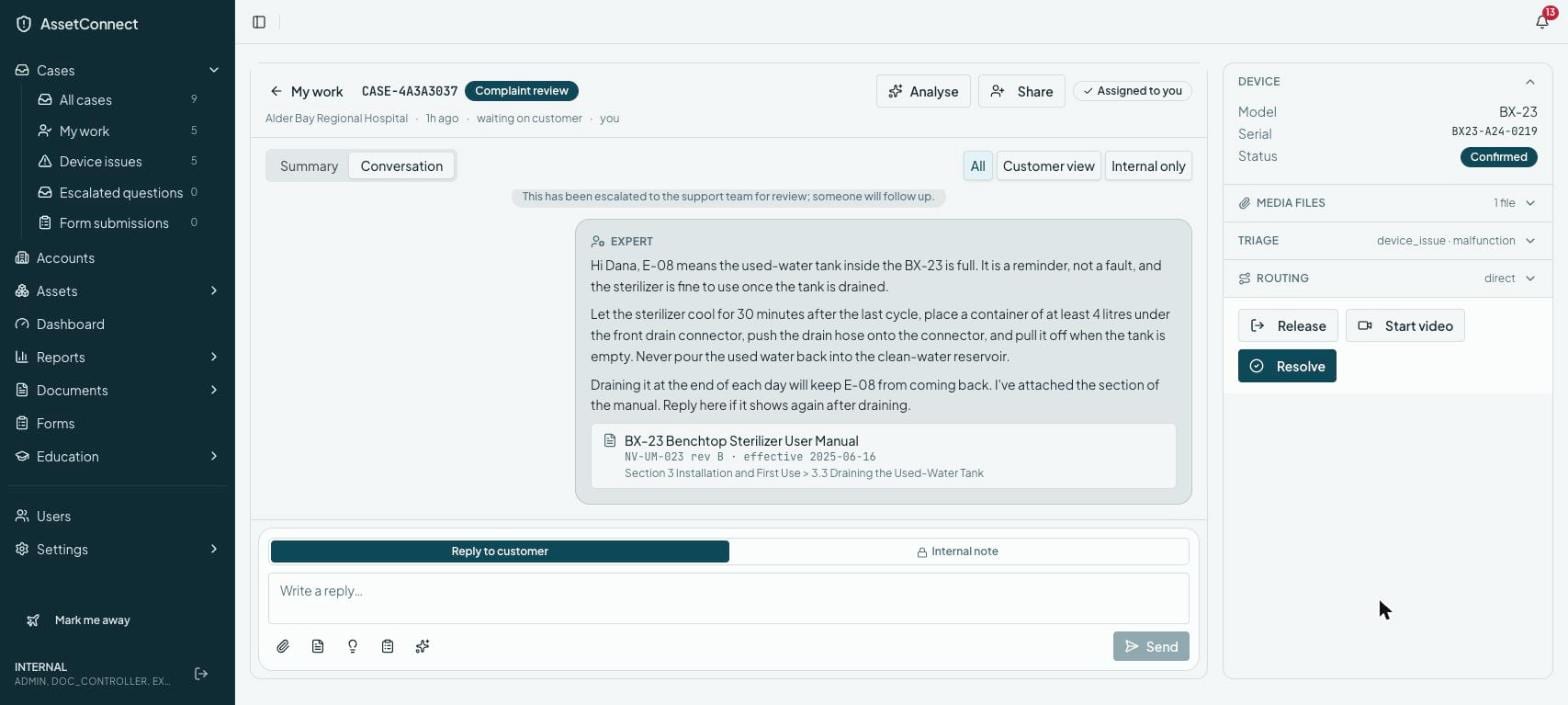
The console. Two queues, context assembled before the first reply, and the analysis tools to close cases faster without lowering the bar.
Two queues that never merge
Support questions and possible-malfunction reports live in separate queues with separate handling.
The rule. Under a medical profile, a possible malfunction cannot be moved into the support queue; it can only proceed to complaint review. Under an industrial profile, it proceeds to guided troubleshooting and a service ticket.
Context assembled before the first reply
Device, configuration, documentation revision, conversation, and prior cases are attached when the case opens.
The rule. The expert sees exactly what the customer saw, including every citation.
Draft reply, accept/edit/discard measured
A draft reply is prepared from the controlled documentation. The expert accepts, edits, or discards it.
The rule. Every draft carries its citations. Accept, edit, and discard rates are recorded per expert and per document.
Similar cases across accounts
Past cases on the same product and symptom, across your customer base, shown alongside the open case.
The rule. Tenant isolation holds. Cases are never shared across manufacturers.
Collaboration and internal notes
Loop in a colleague, leave notes that the customer never sees, hand off cleanly.
The rule. Internal notes are marked and excluded from every customer-facing message.
Case analysis with cited hypotheses
Ask plain-English questions about a case or a population of cases. Each hypothesis cites the logs, photos, or documents it rests on.
The rule. Hypotheses are labelled as hypotheses. The system does not make a reportability determination and has no field for one.
Routing by product and geography with follow-the-sun
Cases route to the team that owns the product in the customer's region, and hand off across time zones.
The rule. Routing rules are configured by your organisation and recorded with every case.
For the organisation
Control over the profile, the documents, the apps, the rules, and the numbers.
Regulatory profile per tenant or product line
Medical device, GxP laboratory, or industrial. The profile sets what happens when a question describes a possible fault.
The rule. A profile can be made stricter per product line. It cannot be made looser than the tenant's baseline.
Controlled documents with revision and effective dates
Upload documents with their revision and effective date. Superseded revisions stay available for units that have not been updated.
The rule. An answer cites the revision that applies to that unit on that date, not the latest revision.
White-label apps
Customer and engineer apps carry your name, your branding, and your domain, published under your app-store account. The console carries your identity for your experts.
The rule. The safety rules are the same under every brand.
Configurable agents that narrow but never widen safety rules
Tune tone, scope, languages, and escalation thresholds per product line or region.
The rule. Configuration can make behaviour more conservative. It cannot disable citations or loosen the hand-off rule of the regulatory profile the tenant is on.
Every change validated against a regression suite before it takes effect
Prompt and configuration changes run against a suite of known questions and known faults before activation.
The rule. A change that fails the suite does not activate. The validation record is attached to the change.
Deflection, response time, and time-to-route measured and exportable
How many questions were answered from documentation, how fast experts replied, and how long a possible fault took to reach complaint review or a ticket.
The rule. Numbers are computed from the audit trail and exportable, so you can check them.
For your systems
AssetConnect AI answers and sees. Your system of record records. Cases, assets, and the record of what the AI said land where your team already works.
API
Every case, answer, routing event, and analysis available to your systems.
The rule. The same audit fields that appear in the dashboard appear in the payload.
MCP server
Your agents, including those inside your CRM, ask AssetConnect AI for a grounded answer about a resolved unit.
The rule. An agent gets exactly what a user would get, a cited answer scoped to that unit's documentation, or "not in the documentation". No wider access through the machine door.
Single sign-on
Console and apps behind your identity provider, through Auth0.
The rule. Role, and therefore document access, follows the identity provider's groups.
Salesforce Service Cloud and Field Service
Cases created and updated from AssetConnect AI, with the conversation, citations, and visual analysis attached. Work orders from an unresolved case. Assets in sync with the registry.
The rule. Salesforce is the record. AssetConnect AI never holds a case Salesforce cannot see, and never creates an asset there from a guess.
ServiceNowNext
The same pattern for OEMs whose support runs on ServiceNow CSM or ITSM.
The rule. As for Salesforce. The system of record is the record.
Standalone
Console, apps, and registry run on their own when there is no CRM.
The rule. Standalone is a deployment option. The safety rules and the audit trail are the same.
Security and trust
What a QA/RA or IT reviewer needs to see. Only what is true today, in the same format as everything else on this page.
Provenance on every output
Every answer, classification, and analysis records its prompt version, model, and the document revisions that grounded it.
The rule. The record is kept for the life of the case and exportable. Auditable two years out.
Change control for the AI
Prompt and configuration changes run against a regression suite of known questions and known faults before activation.
The rule. A change that fails does not activate. The validation record is attached to the change.
Tenant isolation
Each OEM's documents, registry, cases, and configuration are isolated. Similar-case search never crosses manufacturers.
The rule. No shared model training on your data. Your documents ground answers for your users only.
Identity and access
SSO through Auth0. Roles decide which documents a user can be answered from.
The rule. A customer never sees service-level content. Access changes take effect on the next question.
Compliance roadmapIn progress
SOC 2 Type I in progress, Placeholder: target report date. Type II and single-tenant VPC deployment to follow.
The rule. No claim appears here before the report exists.
Ask us to show any of these.
Everything on this page is in the product today, or marked roadmap. Pick a capability and we will demonstrate it.
Request a demo